 vardenis
Home › Security guides
TotalAV explained: what the security suite includes, its limits, and how to decide whether it fits you
This guide contains partner links to TotalAV, marked “Partner link”. If you buy after clicking one, DAMET-IZOLACE STAVEB spol. s r.o., the publisher of this site, may earn a commission. It costs you nothing extra. TotalAV did not write, review or approve this article, and the commission does not depend on what we say. vardenis.online is not affiliated with, endorsed by or sponsored by TotalAV. Read our editorial policy.
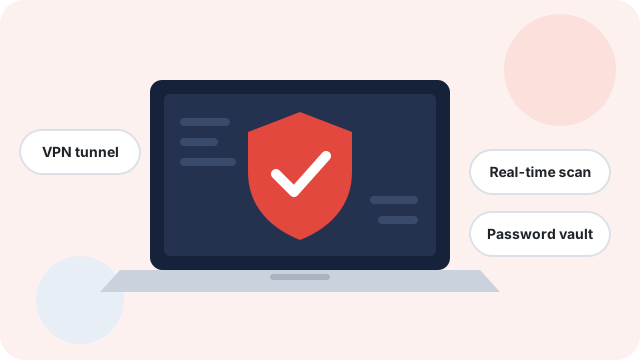
TotalAV is a consumer security subscription that bundles antivirus with extras such as a VPN, an ad blocker, a password manager and PC clean-up tools, depending on the plan. This guide explains what each part actually does, where the limits are, what to check before paying and when you may not need it at all.
Key points
- TotalAV’s core is real-time malware protection for Windows, macOS and Android; iOS apps are more limited because of how Apple’s system works (this applies to every vendor).
- Extras such as the VPN, ad blocker and password manager depend on the plan you buy. Plan names, device limits and prices change and differ by country.
- Windows 10 and 11 already include Microsoft Defender at no extra cost. A paid suite is a convenience and feature choice, not a requirement.
- Like most security subscriptions, the first-year price is usually introductory and the plan renews automatically at a higher standard price unless you cancel.
- Check independent lab results (AV-TEST, AV-Comparatives) yourself; we have not run our own malware tests.
What TotalAV is and who makes it
TotalAV is a security product sold on a subscription basis to home users. According to TotalAV’s own legal pages at the time of writing, it is operated by a company based in the United Kingdom (Protected.net Group Limited). It is sold mainly online, directly from the vendor’s website and through partner sites such as this one.
The product is aimed at people who want a single app and a single bill to cover malware protection and a few related privacy tools, rather than assembling separate products. The interface is built around one dashboard with large buttons for scanning, the VPN and clean-up tasks.
What TotalAV is not: it is not a business endpoint-security product with central management, and it does not replace good habits such as updating your software and keeping backups. Nothing on any computer can promise complete protection, and you should be wary of any marketing that suggests otherwise.
What is typically included, and the caveats
The table below summarises the components TotalAV advertises across its range. Not every plan includes every feature; the exact list for your country is on TotalAV’s pricing page, and that information prevails over this summary.
| Component | What it does | Worth knowing |
|---|---|---|
| Real-time antivirus | Scans files as they are downloaded, opened or run, and quarantines detected malware. | The core feature. Protection quality is best judged from independent lab tests, not from vendor claims. |
| Web protection / browser extension | Warns about or blocks known malicious and phishing sites. | Works only in supported browsers, and new phishing sites can appear before they are listed anywhere. |
| VPN | Encrypts traffic between your device and a VPN server. | Included only in some plans. Does not stop malware or phishing on its own. See the VPN section. |
| Ad blocker | Blocks many adverts and trackers in the browser. | Plan-dependent. Some sites may not display correctly with ad blocking enabled. |
| Password manager | Stores your passwords in an encrypted vault and fills them in for you. | Usually limited to higher-tier plans. See the password manager section. |
| PC clean-up tools | Removes temporary files, finds duplicates, manages start-up apps and uninstalls programs. | Useful housekeeping, but results depend heavily on the state of your computer. See clean-up tools. |
| Data-breach alerts | Checks whether an email address appears in known breach data. | Similar checks are also available free, for example on Have I Been Pwned. |
Check the plans for your country
See current TotalAV plans and featuresPartner link · advertisementPartner link: if you buy after clicking, DAMET-IZOLACE STAVEB spol. s r.o. may earn a commission. It costs you nothing extra and does not change what we write. Prices and terms are set by TotalAV.
How modern antivirus detection works
It helps to understand what an antivirus engine does before comparing products. Modern engines, TotalAV’s included, don’t rely on one technique. They combine several signals:
- Signature matching. The file is compared against fingerprints of known malware. This is fast and reliable for threats that have already been catalogued, but it cannot catch something brand new.
- Heuristic analysis. The engine looks for code structures and characteristics typical of malware, which can catch new variants of known families.
- Behaviour monitoring. Programs are watched as they run. Suddenly encrypting many files, for example, is typical of ransomware and can trigger a block.
- Cloud reputation. The engine checks how common and trusted a file is across the vendor’s user base. A rarely seen, unsigned program attracts more scrutiny.
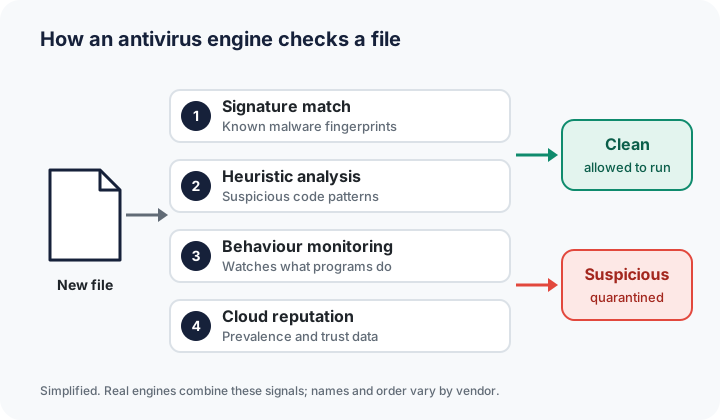
Each layer has trade-offs. More aggressive heuristics catch more threats but also produce more false positives, where legitimate software is flagged. That is why independent tests report both detection rates and false alarms.
Do you need a paid suite if you already have Microsoft Defender?
Every copy of Windows 10 and Windows 11 includes Microsoft Defender Antivirus, which is switched on by default when no other antivirus is installed. Defender is regularly included in independent lab test rounds and is a reasonable baseline for many people.
Reasons people choose a third-party suite such as TotalAV include:
- wanting extras such as a VPN, ad blocker or password manager under one subscription and one app;
- protecting Mac and Android devices from the same account;
- preferring a particular interface or a single dashboard for clean-up tasks.
Reasons you might not need it:
- you only use one Windows PC, keep it updated and are happy with Defender;
- you already pay for a VPN or password manager you like;
- your employer manages security on your work device. Don’t install a second antivirus on a managed machine without asking IT.
Running two real-time antivirus products at the same time is generally not recommended. When you install a third-party product, Windows normally hands real-time protection over to it automatically.
The VPN component: what it does and doesn’t do
A VPN (virtual private network) creates an encrypted connection between your device and a server run by the VPN provider. Your traffic then leaves that server for its destination.
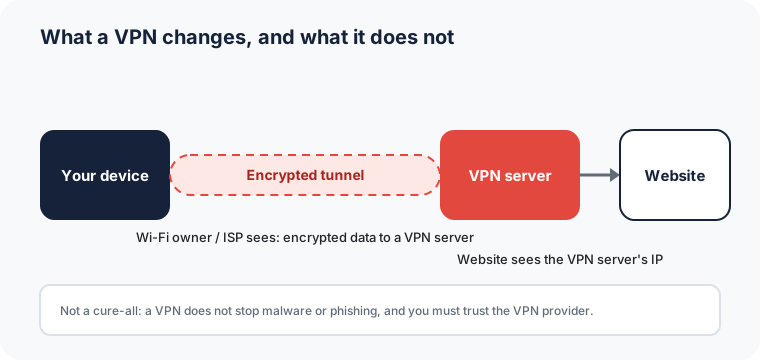
What it helps with: on public Wi-Fi, other people on the network and the hotspot operator can’t read your traffic. Your internet provider sees that you are connected to a VPN but not which sites you visit. Websites see the VPN server’s IP address rather than yours.
What it doesn’t do: it does not block malware or phishing, and it does not make you anonymous. You are logged in to accounts, and the sites you use can still recognise you in other ways. You are also moving your trust from your internet provider to the VPN provider. TotalAV states in its privacy documentation that its VPN does not log browsing activity. We have not independently audited that claim, so read the current policy yourself.
Features such as a kill switch (which cuts the connection if the VPN drops) and the choice of server locations vary by platform and plan, so check TotalAV’s current feature list for your device. Using a VPN to get round the regional restrictions of streaming services may breach those services’ terms. For more detail, read our VPN guide.
The password manager
Reusing passwords is one of the most common reasons accounts get taken over. When one website is breached, attackers try the same email and password combination elsewhere (“credential stuffing”). A password manager removes the need to remember dozens of passwords, so each site can have its own long, random one.
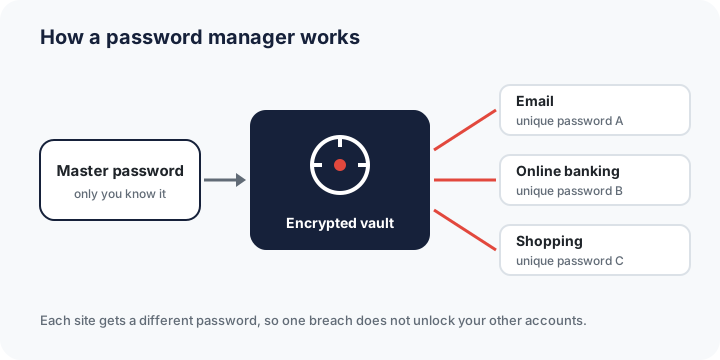
TotalAV’s password manager is included only in certain plans. Whichever password manager you use, choose a strong, memorable master passphrase, turn on multi-factor authentication where offered, and find out how recovery works before you rely on it. Browsers and operating systems also include free password managers. Our password manager guide compares the options in general terms.
PC clean-up tools: realistic expectations
TotalAV includes housekeeping tools: a junk and temporary file cleaner, a duplicate file finder, a start-up programs manager, an application uninstaller and browser data clean-up. These can free up disk space and reduce the number of programs that launch when Windows starts.
Be realistic about performance claims, though. How much difference clean-up makes depends on the computer. A machine with an almost full drive or many start-up programs may feel more responsive afterwards; a well-maintained one may show no noticeable change. The same tasks can be done manually with Windows’ built-in Storage Sense, Disk Clean-up and the Startup apps settings. Before deleting anything, review what a clean-up tool proposes to remove, especially duplicate files, which may include photos you want to keep.
How to read independent lab tests
Vendors’ own claims about detection rates can’t easily be checked. Independent laboratories publish regular comparative tests instead:
- AV-TEST (Germany) rates consumer products on protection, performance and usability in recurring test rounds.
- AV-Comparatives (Austria) runs real-world protection, malware protection, false-positive and performance tests.
Not every product is included in every round, and results change over time. Before buying, check the labs’ most recent reports to see whether TotalAV was tested, when, and how it scored compared with Microsoft Defender and other products. Look at several rounds rather than one, and weigh false positives as well as detection. We did not run our own malware tests for this article and do not quote scores we could not verify.
Pricing, auto-renewal and your rights in the EU
Consumer security software, TotalAV included, is commonly sold with a discounted first term followed by automatic renewal at the standard price. That isn’t unusual, but you should know about it before paying.
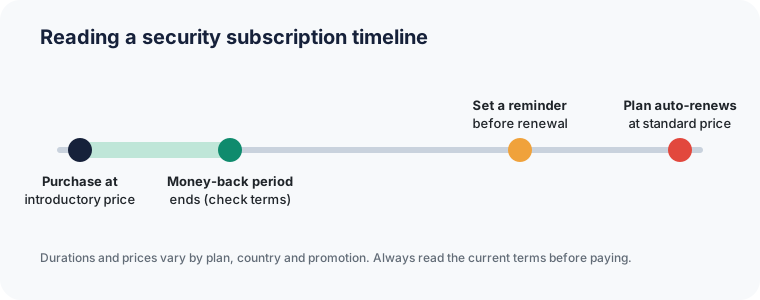
- Check the renewal price shown at checkout, not just the first-year price.
- Note the renewal date in your own calendar, and check in your account how to turn off automatic renewal if you prefer to decide later.
- Money-back guarantee: TotalAV advertises a money-back guarantee. Its length and conditions are set out in TotalAV’s terms, which prevail over anything written here.
- EU right of withdrawal: EU consumer law generally gives you 14 days to withdraw from an online purchase. For digital content and services that start immediately, this right can be lost or reduced once you have expressly agreed to immediate supply. Read the checkout wording carefully. See the European Commission’s Your Europe guidance.
- Free tier: TotalAV has offered a free version with a reduced feature set. Check which features, including real-time protection, are included before relying on it.
We don’t publish prices on this page because they change frequently and differ by country, currency and promotion. The price shown on TotalAV’s own website at checkout is the one that applies.
Who it may suit, and who may not need it
| May suit you if… | May not be necessary if… |
|---|---|
| You want antivirus, a VPN and other tools in one app and one subscription. | You use a single, up-to-date Windows PC and are satisfied with Microsoft Defender. |
| You need to cover a mix of Windows, Mac and Android devices in a household. | You already pay for a separate VPN and password manager you are happy with. |
| You prefer a simple dashboard to configuring several free tools. | Your device is managed by an employer’s IT department. |
| You are comfortable managing an auto-renewing subscription. | You need advanced, business-grade controls or central management. |
A sensible set-up checklist
Whatever product you choose, security works in layers. Antivirus is one of them, not the whole picture.
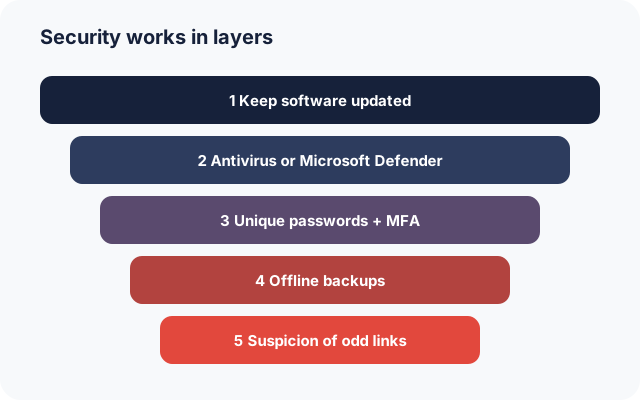
- Download security software only from the vendor’s official website or official app stores.
- After installing, run a full scan, then confirm in Windows Security that exactly one antivirus provides real-time protection.
- Turn on automatic updates for Windows or macOS, your browser and your apps.
- Use a password manager and enable multi-factor authentication on email, banking and social accounts.
- Keep at least one backup that is not permanently connected to your computer, so ransomware cannot encrypt it.
- Record your subscription’s renewal date and decide in advance whether you want it to renew.
Our home PC security checklist goes through these steps in more detail.
Frequently asked questions
Is TotalAV a legitimate product?
Yes. TotalAV is a real, commercially sold security product from an established company. Whether it is the right choice for you depends on the features you need, independent test results and the subscription terms.
Does TotalAV slow down my computer?
Any real-time scanner uses some resources. The impact depends on your hardware and usage. Independent labs measure performance impact, and their recent reports are the best guide. We do not make a claim either way.
Can I use TotalAV on iPhone or iPad?
TotalAV offers an iOS app, but iOS does not let any third-party app scan the whole system the way desktop antivirus does. iOS security apps typically focus on web protection, VPN and breach alerts instead.
How do I cancel automatic renewal?
Renewal settings are managed in your TotalAV account or through TotalAV’s customer support. See TotalAV’s current help pages and terms for the exact steps. We can’t manage subscriptions because we don’t sell the product.
Do you get paid if I buy?
Possibly. If you buy through a link marked “Partner link”, the publisher of this site may receive a commission. It costs you nothing extra. See our editorial policy.
Our assessment
TotalAV is a broad, easy-to-use security bundle that suits people who want malware protection plus a VPN and other tools in a single subscription. Its value depends on which plan you need, whether you would actually use the extras, and how the renewal price compares with alternatives, including the free protection already built into Windows. Check recent independent test results, read the renewal terms at checkout, and decide on the basis of the features you will really use.
Compare TotalAV’s plans yourself
Visit the official TotalAV websitePartner link · advertisementPartner link: if you buy after clicking, DAMET-IZOLACE STAVEB spol. s r.o. may earn a commission. It costs you nothing extra and does not change what we write. Prices and terms are set by TotalAV.
Accuracy and updates. This article reflects publicly available information as of 5 October 2026. Product features, plan contents, prices and terms are set by TotalAV and can change at any time. If anything here differs from information published by TotalAV, TotalAV’s own information prevails. Spotted an error? Email info@vardenis.online. See our corrections policy.
Trademarks. TotalAV is a trademark of its respective owner. vardenis.online is an independent publication and is not affiliated with, endorsed by or sponsored by TotalAV or its operator. Brand names are used only to identify the product being discussed.
Illustrations. All images and diagrams on this page are original works created by vardenis.online. They are not product screenshots.
Sources
- TotalAV, official website: product, pricing and plan pages, privacy policy and terms of service. totalav.com (consulted 5 October 2026).
- AV-TEST GmbH, test results for home user antivirus software. av-test.org
- AV-Comparatives, comparative test reports. av-comparatives.org
- Microsoft Support, “Stay protected with Windows Security”. support.microsoft.com
- European Commission, Your Europe, “Guarantees and returns”. europa.eu
- ENISA (EU Agency for Cybersecurity), cyber hygiene guidance. enisa.europa.eu
- UK National Cyber Security Centre, “Antivirus and other security software”. ncsc.gov.uk
- Have I Been Pwned, free data-breach notification service. haveibeenpwned.com